Cars & racing
DarkRoast simulates cars properly: each wheel has suspension and tyre grip, an engine drives them through an automatic gearbox, and the body leans and slides. You model the car in Blender, tick a couple of boxes, and drive it from a few lines of Lua.
1. Build a car
- The body: model it facing +Y (Blender’s Front view looks at its back), with its origin near the ground. Set Body to Dynamic, Shape to Convex Hull or Box, and Mass to something car-like (1000–1500 kg).
- The wheels: separate objects parented to the body (Ctrl+P), where the wheels should sit, with the axle along their local X (a cylinder rotated 90° about Y, rotation applied). Tick Wheel on each one in Object Components → Vehicle. Linked duplicates (Alt+D) are fine.
- Make it a vehicle: select the body and tick the Vehicle panel’s checkbox. The panel counts the wheels it found.
The wheels’ size comes from their meshes. Wheels ahead of the body’s origin steer; the rear pair is driven (or all four with Four-Wheel Drive). Each wheel starts half way through its suspension travel, so place them where they look right with the car resting.
Vehicle settings
| Engine Torque (Nm) | How hard it pulls. 300 is a family car, 650 a sports car; the demo’s cars have 900 (0–100 km/h in about 3 seconds). |
| Max RPM | Where the engine tops out. The gearbox is automatic: it shifts up at 85% of this, in a fifth of a second. |
| Steering (°) | How far the front wheels turn. |
| Four-Wheel Drive | Drive every wheel (off: rear-wheel drive). |
| Suspension Travel, Stiffness, Damping | Soft and long for off-road, short and stiff for racing. |
| Grip | Tyre grip. Below 1 slides (ice, a loose surface), above 1 corners harder. The demo’s cars use 1.6: about 1.2–1.5 g in corners. |
The rear tyres grip a little better sideways than the fronts, so a car pushed too hard runs wide instead of spinning (the handbrake still breaks the rear loose for a drift). Cars lean in corners, up to 30°, but can’t roll over. The road’s Friction counts too: give grass less (0.5) than tarmac (1.0) and cars run wide when they leave the track.
2. Drive it
A car only moves when a script drives it. Put this on the car (and set the World’s Player to None (Scripts), since the car is the player):
function on_update(self, dt)
  local x, y = input.move()                 -- W/S and A/D, or the left stick
  local v = self.vehicle                    -- speed, kmh, rpm, gear, wheels_on_ground
  local throttle, brake = 0, 0
  if y > 0 then throttle = y
  elseif y < 0 then
    if v.speed > 1 then brake = -y else throttle = y end  -- brake, then reverse
  end
  local handbrake = input.down("jump") and 1 or 0
  self:drive(throttle, x, brake, handbrake)
  ui.set("speed", string.format("%d km/h", math.abs(v.kmh)))
end
self:drive(throttle, steer, brake, handbrake) holds until you call it again: throttle −1 to 1 (negative reverses), steer −1 to 1 (positive is right), brake and handbrake 0 to 1.
s = s + (x - s) * dt * 8). At speed it turns the wheels only as far as the hardest turn the tyres can take: reach = math.deg(math.atan(wheelbase * 1.6 * 9.81, speed * speed)) + 7 (the turn’s angle plus the few degrees a gripping tyre points past its path), then s * math.min(reach / max_steer, 1). And a stability assist: when the rear starts to slide (and the handbrake isn’t on), it eases off the throttle and steers a little into the slide. See the player car’s script in racing_demo.blend.3. Chase camera
Keep the camera behind the car, easing only its heading, so it never falls behind at speed and bumps don’t shake it:
local heading = nil
-- in on_update, after driving:
local p, f = self.position, self.forward
local flat = vec3(f.x, f.y, 0):normalized()
heading = heading and heading:lerp(flat, math.min(1, dt * 4)):normalized() or flat
camera.set(p - heading * 7 + vec3(0, 0, 2.6), p + heading * 4 + vec3(0, 0, 1))
4. AI drivers
Lay waypoints along the track’s centre line (the demo stores them as a list in a custom property, find("Track").props.waypoints). An AI driver then needs two things each frame:
- Steering: pick the waypoint a little ahead (further at speed) and steer towards it:
x, y = to:dot(self.right), to:dot(self.forward),steer = math.atan(x, y) * 2. - Speed: how fast a corner can be taken comes from its radius,
v = sqrt(grip × 9.81 × radius). Look at the corners coming up and keep undersqrt(v_corner² + 2 × braking × distance): throttle below it, brake above it.
Traffic: look at the other cars each frame. One ahead in your path and slower: on a straight, pull out to pass on the side with more room (shift the point you steer at sideways, a few metres, staying on the road); in a corner, follow it at a distance that grows with speed. One alongside: steer a little away from it, and if it's slightly ahead, lift off and tuck in behind. Plan corners with less grip than the tyres have (the demo uses 1.05 g for tyres that hold 1.6) and steer at a point only a short way ahead, or the cars cut in and run wide on the exits.
Give each AI car a skill custom property that scales its corner speeds (0.9–1.0), so they race each other rather than in a line. If a car is stuck or on its roof for a few seconds, put it back on the nearest waypoint: set position, then rotation = vec3(0, 0, heading) (that also stops it).
5. Laps & positions
The level script tracks each car’s nearest waypoint (searching a few either side of the last one). When it jumps from the last few waypoints to the first few, the car crossed the line: one more lap. Position is laps first, then waypoint index. A countdown is just ui.message("3")… while the cars hold the brake, then a game.go = true their scripts check.
Making a track
- Draw the centre line as a curve and build the road along it (an Array + Curve modifier on a road segment, or a script like the demo’s). Keep it a Static mesh with Friction 1.
- Barriers on both sides keep cars on the track. Make them taller than a wheel can climb (the demo’s are 2 m) and give them low friction (0.3), so cars slide along them instead of stopping dead or riding up and over.
- Trees and scenery as linked duplicates are drawn as instances: hundreds cost little.
- List the car’s controls in the pause menu with
ui.controls{{"Accelerate", "forward"}, {"Brake / reverse", "back"}, {"Steer left", "left"}, {"Steer right", "right"}, {"Handbrake", "jump"}}.
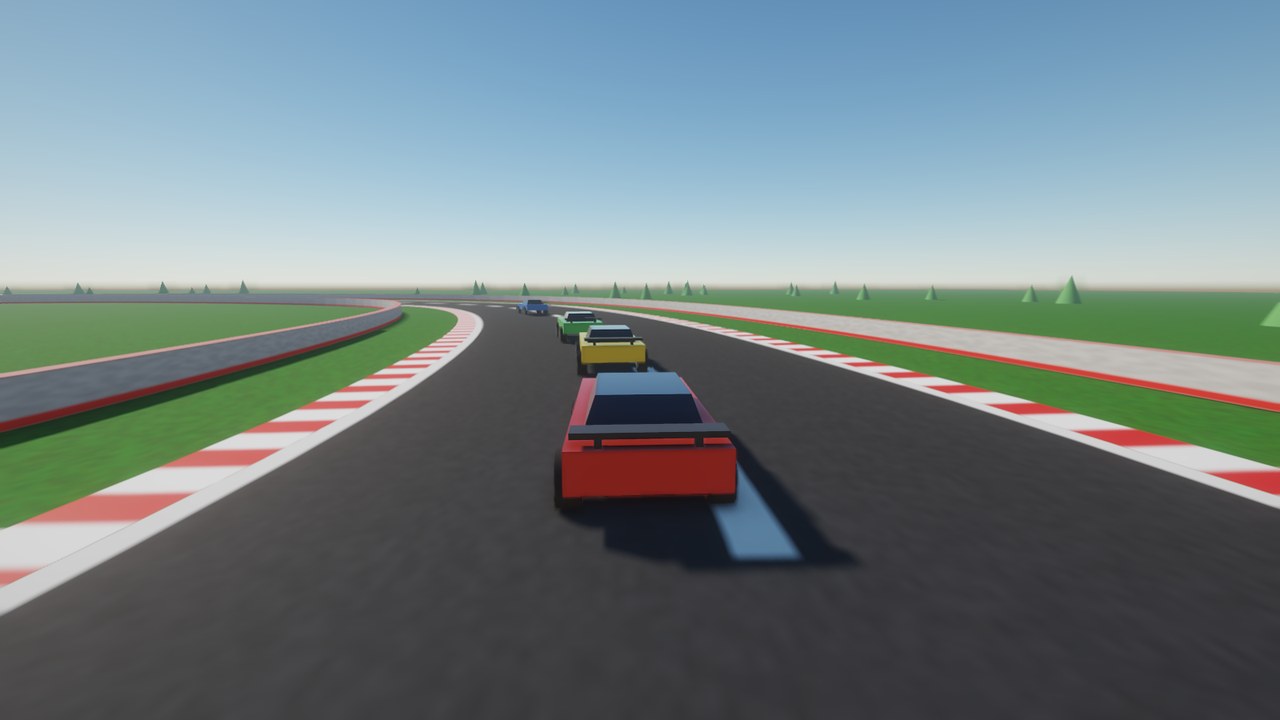
The demo
The Racing Demo on the download page is a complete race made this way: a 720 m circuit, a race menu (1–10 laps, up to seven AI opponents, and how fast they drive, remembered with save()), a countdown, positions, lap times, a saved best lap, and the results at the end while the AI drives your car round. Host a race opens a lobby for up to eight; the others pick it from their list of races on the network (or join by address), and the AI fills the grid. The menu is the level script’s ui.menu; unused opponents are taken off the grid with destroy(). W/S accelerate and brake, A/D steer, Space is the handbrake, R puts you back on the track, Enter races again with the same settings, M goes back to the race menu. In the Samples & docs download, samples\racing_demo.blend has every script (click a car, or World → Level Script), and samples\make_racing_demo.py builds the whole level, track included.
Racing with friends
In multiplayer the host runs the race (laps, positions, the AI cars) and each player drives their own car on their own machine, so it answers the controls at once: the host hands it over with net.give(car, player_id). That player's machine simulates the car, physics and all, and everyone else, the host included, follows it. Mark the cars Replicate. The host shares the standings with net.set, and each machine chases its own car with the camera. In a car script, net.mine(self) says whether this machine drives it.
Limits
- Cars copied with
spawn()don’t get wheels yet: place every car in Blender. - Four-wheeled cars (or three-wheelers) only; no motorbikes or tanks yet.
- Engine sound is up to you: give the car a looping Sound and set
self.sound_pitchfromself.vehicle.rpm(the demo uses0.6 + (rpm - 1000) / 5000 * 1.8).